
Best Contact Finder Tools for Sales (2026): Sorted by the Job You Are Actually Doing

Contactwho Research · How we write
Guides from the team that builds Contactwho, grounded in thousands of real buyer searches. Drafted with AI assistance, edited and fact-checked by people.
The best contact finder tools for sales in 2026 split by job: domain lookup (Hunter), LinkedIn-native extensions (Lusha, Kaspr), all-in-one databases (Apollo, Cognism, RocketReach), verified list-building (UpLead), and fit-ranking the people at one company. Pick by the job in front of you. Every tool except the last assumes you already know who to look up.
Every ranking of contact finder tools is a ranking of email finders. LaGrowthMachine lists eight. ZoomInfo's blog lists ten. Each one answers the same question: given a name and a company, what is the address. None of them asks the question that comes before it, which is whose name.
That is not a small omission. It is the whole job.
Five jobs hiding under one search term
"Contact finder" covers at least five different chores, and a tool that is excellent at one is usually mediocre at the others.
- Domain lookup. You know the company and a name. You need the address pattern and a verified result.
- LinkedIn-native. You are on a profile. You want the email or mobile without leaving the tab.
- All-in-one database. You want search, contact data, sequences and CRM sync in one login.
- Verified mobiles. Your motion is calls, and a wrong number costs more than a wrong email.
- Fit-ranked per company. You know the account. You do not know which of its 300 people owns the purchase.
Most teams need two of these. Almost nobody needs all five, and buying a platform to get all five is how a three-person team ends up with an annual contract it uses on Tuesdays. The piece on choosing a ZoomInfo alternative for a small sales team goes into the seat-count question; this one is about the tools themselves.
Best contact finder tools for sales, sorted by the job
Prices are entry-level paid plans, billed monthly, from each vendor's own pricing page as of September 2026.
Domain lookup: Hunter
Type a domain, get the pattern the company uses and a list of addresses seen publicly on that pattern. Type a name, get the constructed address with a confidence score, and verify it in the same tool. Free plan with 50 credits a month; Starter is $49 a month for 2,000 credits. The trade-off is scope: Hunter is emails only, no phones, and it finds addresses for names you bring.
LinkedIn-native: Lusha and Kaspr
Both live in a browser extension and light up when you open a profile. Click, spend a credit, get the email or number. Lusha has a free plan with 40 credits a month and a Starter plan at $49.90 for 400 credits. Kaspr publishes pricing on its site. Trade-off: the extension is only as good as the profile you chose to open, and credits go fastest on the people you were merely curious about.
All-in-one database: Apollo, Cognism, RocketReach
Apollo bundles a contact database with sequences and a light CRM; there is a free plan and paid pricing is published on its site. Cognism sells through its sales team, with no public price list, and positions itself on phone-verified mobiles and European coverage. RocketReach is a broad person-lookup database and publishes pricing on its site. The trade-off is the same for all three: the database is the product, so every filter you apply is a guess about who matters, and the platform will not tell you if the guess is wrong.
Verified list-building: UpLead
UpLead's pitch is verification at the moment of export, so the list you download has been checked rather than labelled. Essentials is $99 a month for 170 credits. Trade-off: it is the most expensive per credit among the public prices here, and it is built for building lists, not for working one account at a time.
Verified mobiles: Cognism and Lusha
If your motion is the phone, the question is not whether a tool has a number but whether the number was checked recently. Cognism cites a UserEvidence study, which Cognism commissioned, reporting a 22% connect rate on its mobiles against 14% for ZoomInfo's. A vendor-funded number about the vendor is still a vendor's number. Lusha's extension returns mobiles per credit. Neither will tell you if you are calling the wrong person.
Fit-ranked per company: Contactwho
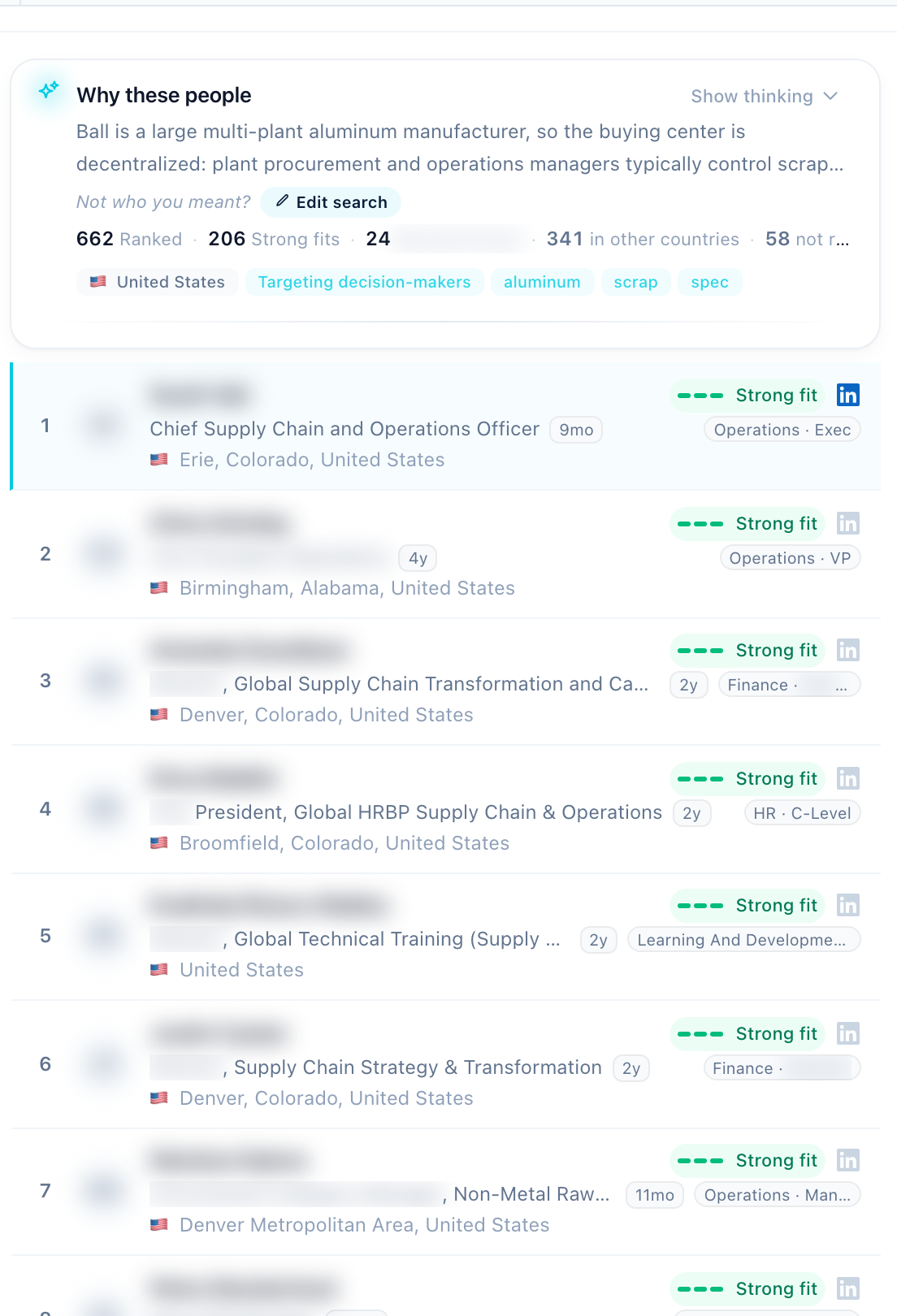
Different shape entirely. You type what you sell and one company name. Contactwho reads that company's people from licensed B2B data, ranks them by fit for that specific intent, explains why each person is there, and marks a top five. Reveals of verified emails and phones cost credits (1 per email, 5 per phone); searches are unlimited on every plan, including the 14-day trial. Solo is $29 a month. Trade-off: it is not a bulk database. You bring the account list, and phone reveals need a paid plan.
| Tool | Job | Entry price, September 2026 | Trade-off |
|---|---|---|---|
| Hunter | Domain lookup | Free 50 credits a month; Starter $49 a month | Emails only; you bring the names |
| Lusha | LinkedIn-native, mobiles | Free 40 credits a month; Starter $49.90 a month | Only as good as the profile you opened |
| Kaspr | LinkedIn-native | Publishes pricing on its site | Same: per profile, per credit |
| Apollo | All-in-one database | Free plan; paid pricing on its site | Platform overhead; filters are guesses |
| Cognism | All-in-one, verified mobiles | Sold via sales, no public price | Team-sized pricing; still your pick |
| RocketReach | All-in-one lookup | Publishes pricing on its site | Lookup-metered; no help choosing |
| UpLead | Verified list-building | Essentials $99 a month | Priciest per credit; list-first |
| Contactwho | Fit-ranked per company | Solo $29 a month; unlimited searches, credits on reveals | Not a bulk database; you bring the accounts |
What none of them do
Every tool above except the last takes a name as input. So the accuracy question everyone asks ("how good is the data") sits downstream of a question nobody asks: is this the right name.
Here is how often the obvious guess is wrong. Contactwho labels a primary buying center on every search. Across the two themes with enough volume to trust:
| Primary buying center | Staffing and recruiting (371 searches with a resolved buying center) | Industrial byproducts and recycling (713 searches with a resolved buying center) |
|---|---|---|
| HR leadership | 50% | - |
| Talent acquisition / recruiting | 31% | - |
| Operations / plant | 6% | 35% |
| Sustainability / EHS | - | 34% |
| Procurement / supply chain | - | 21% |
| Owner / executive | 5% | 2% |
If you sell staffing, the owner or CEO is the buyer 5% of the time and HR or talent acquisition owns it 81% of the time. If you sell scrap and byproduct services, procurement, the title most people search for first, is primary in only 21% of accounts; operations and the sustainability owner split most of the rest. A finder cannot tell you that. It will happily return the CEO's verified email and let you burn the account.
The second thing none of them do is guarantee the address. In our reveal pipeline, 856 contacts were enriched and a verified work email was found for 674, which is 79%. Of 733 graded emails, 72% came back grade A, verified and deliverable at the time of the check. And 38% of pattern-based guesses failed live verification. The vendor label "verified" and a live check are two different things, which is the whole argument of the piece on finding verified work emails.
A selection checklist you can run in a week
Run this against every tool on your shortlist before paying for a month.
- Write down 20 real accounts and, for ten, the title you expect to own the purchase.
- Does the tool help you find who, or only what address? Say it out loud.
- Reveal 20 emails. Verify them on an independent checker. Count deliverables.
- Reveal five phones if your motion is calls. Dial them.
- Time the path from company name to a sendable list of five people.
- Check the meter: what exactly costs a credit, and what a reveal that fails costs you.
- Check the export: CSV and your CRM, or a proprietary sequence tool you now have to use.
- Check what the free tier withholds. Usually it is the reveal.
- Read the data-processing terms before you paste EU names into anything.
- Add up the month at the credits you actually used, not the plan headline.
The mistakes that eat a small team's first quarter
Buying a database for 40 accounts. Coverage is an enterprise worry. You already know your accounts.
Reading the accuracy percentage as a measurement. It is a claim, made by the vendor, about the vendor, with no independent test behind it. Every one of them.
Filtering by seniority. In our staffing top fives (183 people across 40 searches), managers are 32% of the right people, heads 9%, directors 7% and C-level 1%. "Director and above" deletes the buyer.
Treating the tool's "verified" as verified. Verified when, and how. If you need the vocabulary, the comparison of contact enrichment and email verification separates the two.
Sequencing off the first export. The export is a list of people you have not chosen. Choose first.
Questions people ask
What is the best tool to find B2B contact details? There is no single best; there is a best per job. Hunter for domain lookups, Lusha or Kaspr for LinkedIn profiles, Apollo or Cognism or RocketReach if you want one database login, UpLead for verified lists, and Contactwho if you know the company but not the person. Pick the job first.
How accurate are contact finding tools? Nobody publishes an independent test, so every figure is a vendor claim. The only accuracy number you can trust is one you produce: reveal 20, verify on an independent checker, count. For reference, 72% of the 733 emails graded in our reveal pipeline were grade A, and 38% of pattern guesses failed verification.
Are contact finder tools GDPR compliant? The tool's compliance is not your compliance. Under GDPR the lawful basis for contacting a business person is yours to establish, usually legitimate interest, and the tool's data-processing agreement is the document to read. Check where the data is stored, how the vendor sourced it, and how you will honour a deletion request. This is not legal advice.
What is the difference between an email finder and data enrichment? An email finder takes a name and a company and returns an address. Enrichment takes a record you already have and adds fields: title, phone, company size, a fresher email. Most tools do both to some degree, and neither tells you whether the person is the right one.
What bounce rate should I expect? Nobody can promise one, and anybody who does is selling something. What you can control is whether every address passed a live check before it went into a sequence. In our pipeline, 5% of graded emails came back grade D, which we do not hand over as verified, and 4% of email reveal jobs were refunded because nothing verifiable came back.
Choose the job, then the tool
If your job is the fifth one, knowing the account and not the person, Contactwho is built for it: one company, what you sell, ranked people with reasons, verified details on reveal. It will not replace a domain lookup or a LinkedIn extension for the first four jobs.
Rule for the next 30 days: before any tool gets a credit card, write the title you expect at ten accounts and see which tool argues with you. The one that argues, and is right, is the one to pay for.